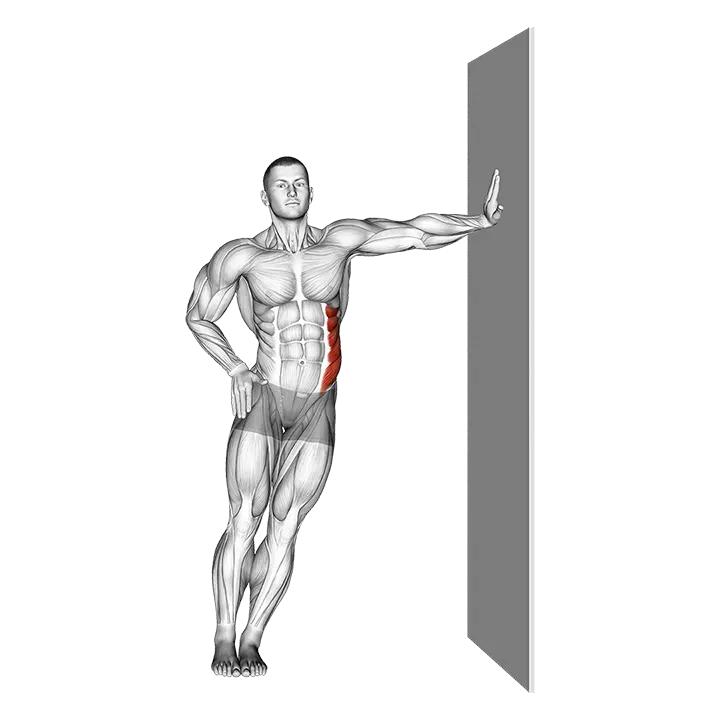
Standing Lower Trunk Lateral Flexor Stretch
- Músculo objetivo
- —
- Equipamiento
- Body weight
- Parte del cuerpo
- Back
- Tipo
- Stretching
The Standing Lower Trunk Lateral Flexor Stretch is a bodyweight mobility exercise that lengthens the lateral muscles and soft tissue along the lower back and side of the trunk. Performed standing with a controlled side bend, it works to restore and improve lateral range of motion in the lower spine. It fits well as a warm-up movement or a cool-down stretch to relieve stiffness in the back.
Cómo hacer el Standing Lower Trunk Lateral Flexor Stretch


- 1Stand upright with your feet hip-width apart and your arms relaxed at your sides.
- 2Engage your core lightly, lengthen your spine, and keep your gaze forward.
- 3Raise one arm straight overhead, keeping it close to your ear with the palm facing inward.
- 4Slowly lean your entire torso to the opposite side, letting the raised arm arc overhead in the same direction.
- 5Stop when you feel a firm stretch along the side of your lower back and trunk — do not twist or rotate.
- 6Hold the end position for 20–30 seconds, keeping both feet flat on the floor and your hips level.
- 7Slowly return to the upright position under control, then lower your arm.
- 8Repeat on the other side, raising the opposite arm and bending in the opposite direction.
Consejos de técnica
- Keep both feet firmly planted and resist the urge to let the near hip drift outward — a stable base keeps the stretch focused on the lower trunk.
- Move only in the lateral plane: if you feel your chest rotating toward the floor, you have gone too far and are losing the side-bend angle.
- Breathe steadily throughout the hold and try to exhale gently to release a little more into the stretch each breath.
- Keep the raised arm close to your ear rather than letting it drift forward, which maintains true lateral alignment and maximises the stretch along the side of the back.
Errores comunes
- Rotating the torso while bending, which redirects tension away from the lateral lower trunk and reduces the effectiveness of the stretch.
- Letting the hip on the near side push outward, which shortens the stretch and can place unwanted stress on the hip joint.
- Holding the breath throughout the stretch, which increases muscular tension and limits how far the tissues can lengthen.
- Holding for fewer than 15 seconds — connective tissue and muscle need sustained time under gentle tension to lengthen; brief holds produce little lasting change.
- Snapping back to the upright position instead of returning slowly, which can strain the muscles that were just lengthened.
Preguntas frecuentes
What does the Standing Lower Trunk Lateral Flexor Stretch target?
It targets the lateral muscles and connective tissue along the side of the lower back and trunk. Because no single muscle is isolated, the stretch benefits the whole lateral chain in that region, including the side of the lower spine.
How long should I hold the Standing Lower Trunk Lateral Flexor Stretch?
Hold each side for 20–30 seconds. For general mobility work, two to three rounds per side is enough. If you are working on a specific stiffness, up to 60 seconds per hold can be used, provided there is no sharp pain.
Is this stretch good for lower back stiffness?
Yes — a gentle lateral flexor stretch can relieve tension in the sides of the lower back that builds up from prolonged sitting or repetitive movements. Stop immediately if you feel any sharp or radiating pain and consult a healthcare professional.
Should I do this stretch before or after a workout?
It works well in both contexts. Before training, keep holds to 10–15 seconds to mobilise without over-relaxing the muscles. After training or on rest days, hold for 20–30 seconds to aid recovery and improve lasting flexibility.
What are good alternatives to the Standing Lower Trunk Lateral Flexor Stretch?
Seated side bends, the supine knee-drop stretch, and the lying pretzel stretch all target the lateral lower back in a different body position. These can be useful if standing balance is a challenge or if you prefer a supported version.